
Additional Training
CONTENTS
SAFETY MISSION STATEMENT
FIRE
POWER FAILURE
WORKPLACE SAFETY
SECURITY
MEDICAL EMERGENCIES
ERGONOMICS AND GENERAL OFFICE SAFETY
LIFTING
CUSTOMER SERVICE TRAINING
CUSTOMER SERVICE & “THE RULE OF 1965”
CUSTOMER SERVICE REVIEW
MANAGING THE PROBLEM PATRON
SIGNATURE CUSTOMER SERVICE
RULES OF THE RAPIDES PARISH LIBRARY
MANDATORY ANNUAL TRAINING
WHO GETS WHAT
FRIENDS OF THE RAPIDES LIBRARY
RPL INCIDENT REPORT
BOMB THREAT
EMERGENCY PROCEDURES
GLOSSARY
EZ-WEB TRACK FOR STAFF
ORGANIZATIONAL CHART
CHAIN OF AUTHORITY
ADDRESSES, SCHEDULES AND PHONE NUMBERS
PHONE EXTENSIONS
ABBREVIATIONS
HUIE-DELLMON HOUSE
WORKPLACE FIRE & SAFETY
SAFETY MISSION STATEMENT
The personal safety and health of each employee of the Rapides Parish Library, (RPL), is of primary importance. The policy of the RPL is to maintain a safe and working environment at all times and comply with all state and local safety requirements. The prevention of occupationally induced injuries and illnesses are a priority by management and employees and will be given precedence in all operational matters. RPL will not knowingly allow unsafe conditions to exist, or permit employees to participate in unsafe activities.
James Layssard is RPL’s Safety Manager and will be responsible for implementing and maintaining RPL’s safety program. This Safety Procedure applies to ALL branches, employees and departments of RPL.
The purpose of this procedure is to provide methods for the maintenance and evaluation of a safe working environment and to outline procedures for handling injuries and subsequent reporting requirements.

FIRE
All employees are instructed to be continuously aware of fire prevention even though RPL does not engage in activities that present a high fire danger.
- Smoking by employees will be restricted to designated smoking areas only.
- Emergency exits are to remain free of obstructions at all times. NO EXCEPTIONS.
- A sufficient number of fire extinguishers will be available throughout the facility, and will be clearly marked.
- All flammable liquids will be stored in a storage cabinet that is specifically designed for these products. Flammable liquids should not be used for cleaning if a nonflammable product can be substituted.
- A Material Safety Data Sheet (MSDS) will be displayed on the storage cabinet of chemicals used at the RPL. A MSDS is a detailed information bulletin prepared by the manufacturer or importer of a chemical that describes the physical and chemical properties, physical and health hazards, routes of exposure, precautions for safe handling and use, emergency and first-aid procedures, and control measures.
Fire Procedures
Department Heads and Branch Managers are to ensure that all staff members know the location of fire alarms, fire extinguishers and emergency exits. Branch Managers and Department Heads are responsible for training staff members where the assembly area for fire and/or fire drills is located.
If you discover a fire or detect smoke follow the procedures below;
- Sound the nearest FIRE ALARM and call the fire department, or emergency #911.
- If possible, attempt to control the fire with an extinguisher; however, do not put yourself in danger. Otherwise, vacate the area.
- Report the fire to your Supervisor or the Supervisor on duty, the Security Monitor and Rapides Parish Library Director or any member of the administrative staff that is on duty. If a fire occurs after normal working hours, notify the Library Director, Assistant Director or the Human Resources Manager as soon as feasible.
- Assemble in the designated area outside as previously instructed by the branch manager or department head.
- Await the arrival of the fire truck to inform the firefighters of the location of the fire.
When you hear the fire alarm, follow the procedures below;
- When the alarm sounds, ALL persons in the building MUST evacuate the building as soon as possible. It is the duty of Library staff members, particularly the Supervisors on duty, to ensure that all patrons leave the building as quickly as possible through the nearest exit and take their possessions with them.
- If possible and time permits, before you leave close all doors, turn ON all lights, turn OFF all machinery, appliances, computers and office equipment.
- 3. Supervisors are to assemble all staff members in a designated area out of the way of emergency personnel and vehicles, and ensure that all staff members are present. DO NOT ALLOW ANYONE TO GO BACK INTO THE BUILDING
- Supervisors should make every effort to ensure no one remains in the building. Any doubts about the building not being cleared should be reported to the firefighters immediately.
POWER FAILURE
Department Heads and Branch Managers are required to always keep a functional flashlight in a designated place for staff members to use if the power fails. If there is a power failure, the following procedures should be carried out;
- Get your emergency flashlight and gather all patrons in one central location.
- If possible, contact the local utility officials to determine when the power will be restored. If it is for an undetermined length of time, the Library should be cleared of all staff members and guests; and the Director or Assistant Director must be contacted for specific instructions. If you cannot contact local utility officials, clear the Library of all persons immediately and contact the Director or Assistant Director from another location.
- Allow no one to use a lighter or light match. Use your emergency flashlight only.
- Library patrons should leave the Library quickly and take their possessions with them. However, they cannot charge out Library books, unless service is authorized to continue, despite the power failure.
WORKPLACE SAFETY
A safe work environment must be everyone’s goal. Accordingly, all employees are encouraged to evaluate their work methods and areas for potential safety hazards and/or ideas for improving safety in their work environment. Employees with ideas for accident prevention should complete a Safety Suggestion Sheet (see below), review it with their department manager and forward to the RLP’s Safety Manager for follow-up. Additionally, the OSHA Job Safety & Health Protection poster will be displayed on RPL’s bulletin board as a reminder to all employees of the importance of workplace safety. The Safety Manager will conduct an annual thorough self-inspection to identify any potential safety hazards and create a formal action plan for improving the safety of operations.
Branch managers and department managers will be responsible for creating and maintaining safe job specific work procedures necessary to prevent and control hazards. These control procedures are the basic means for preventing accidents.
All employees shall follow these and their specific branch or department’s workplace safety rules, render every possible aid to safe operations, and report all unsafe conditions or practices to their supervisor or the designated Safety Manager.
- Do not do anything that would be hazardous to you or another co-worker or customer. If you are assigned a task that you believe is unsafe or hazardous, inform your supervisor. If your supervisor fails to respond, follow the chain of command.
- Read the OSHA and Safety Posters at job site.
- Comply with all applicable Library Standards.
- Follow all lawful employer safety and health rules and regulations, and wear or use prescribed personal protective equipment while working.
- All injuries, illnesses and non-injury accidents that are the result of a work accident or from an exposure in the work environment must be reported to the department/branch manager and the Human Resource Manager. Further, any incident including fire, explosion, water damage, spill, collapse and any similar event that results or could result in significant personal injury or damage to the building and equipment will be reported as above.
- No one shall knowingly be permitted or required to work while his or her ability or alertness is impaired by fatigue, illness or other causes that might expose the individual or others to injury. Anyone known to be under the influence of alcohol and/or non-prescription drugs shall not be allowed on the job while in that condition.
- Employees should be alert to see that all guards and other protective devices are in proper places and adjusted, and shall report deficiencies. Approved protective equipment shall be worn in specified work areas.
- Horseplay, scuffling and other acts, which tend to endanger the safety or well-being of employees are prohibited.
- Workers shall not handle, tamper with or operate any machinery or equipment not within the scope of their duties, unless they have received special permission and instructions from their supervisor.
- Loose or frayed clothing, dangling ties, finger rings, etc. must not be worn around moving machinery or other places they can get caught.
- Wash thoroughly after handling any injurious or poisonous substances.
- Do not throw material, tools or other objects from heights (whether structures or buildings) until proper precautions are taken to protect others from the falling object hazard. When using ladders, arrange work so that you are able to face the ladder and use both hands while climbing.
SECURITY
General order of the library is the responsibility of the supervisor in charge. However, it is the duty of all library employees to maintain order in the library. The security officer is there to assist employees in accomplishing this goal. When a security officer is on duty, supervisors cede the authority & responsibility to remove someone from the library and that responsibility or judgment belongs to that of the security officer. Removing someone from the library should be a last resort but is necessary at times. The basic guidelines for removing someone from the library are;
- First Warning;
- Talk to the patron in a pleasant manner. Explain to them the problem and tell them the corrective action that needs to be taken by them.
- Advise the Security Monitor, Branch Manager or Department Head about the situation and your actions.
- Second Warning;
- If the situation is not corrected, notify the Security Monitor, Branch Manager or Department Head. Tell them that the situation has not been corrected. It will be the Security Monitor, Branch Manager or Department Head’s responsibility to warn the patron of the consequences of not correcting the situation, i.e. removal from the library if it is not corrected immediately.
- This warning is done with a more serious tone.
- Third Warning is removal from the library. This is to be done by the Security monitor, Branch Manager or Department Head.
In no way are you to jeopardize your safety or the safety of others. If needed, CALL POLICE IMMEDIATELY.
MEDICAL EMERGENCIES
A first aid kit will be kept at the Main Library and all branches. The branch manager will be responsible for replenishing supplies in the kit.
Emergencies or injuries that require medical care but are not life threatening and can be safely transported by automobile will be treated at the local health care facility. The local emergency rescue service will be called for any serious life-threatening injuries, and for transporting injured employees that can not be safely transported by automobile.
The local emergency rescue service in our area is contacted by dialing 911. Our area has enhanced 911 services. This number is also used for fire and police service
ERGONOMICS AND GENERAL OFFICE SAFETY
Workstation Ergonomics
“Ergonomics is concerned with the design of working systems in which human beings interact with machines.” — Stephen Pheasant, Ph.D., FErgS in Ergonomics, Work and Health (1991).
It is the “science” of fitting the workplace to the worker — not the worker to the workplace.
You spend one-third of your day at work…make it a comfortable day!
Cumulative Trauma Disorder (CTD), Repetitive Strain Injury (RSI)
CTD is a condition of wear and tear on tendons, muscles and nerves which results from cumulative overuse and often results in producing pain. The keyword is CUMULATIVE.
The three primary risk factors found in office environments which can lead to CTD are:
- REPETITION
- FORCE
- AWKWARD POSTURE
These risk factors can be controlled by adjusting workstations to fit you (changing work postures, reducing continuous repetitions, and stretching periodically).
There is no best sitting posture. Studies have concluded that “80-90% of computer users prefer a reclined position”, (Grandjean 1980 & Laubli 1986). Biomechanical studies have shown “sitting slightly reclined with a torso-high angle of 110° reduces disc pressure 20-30% and muscle activity 30-40%”, (Anderson, MD & Ortengren 1974).
Computers and Work Stations
To create a workstation that fits you, try the following suggestions:
- Adjust furniture to fit you
- Chairs are now made in different sizes…your chair should be the right size for you.
- Adjustable arms.
- Comfortable lumbar support.
- Comfortable seat pan that fits and swivels.
- Chairs are now made in different sizes…your chair should be the right size for you.
- What is right for one person may NOT be for another.
- Listen to your body.
- Adjust Your Workstation!
- Key boards should be adjusted to provide comfortable (neutral) posture
- Place mouse/trackball next to keyboard — do not stretch/reach
- Monitors should be adjusted to provide the MOST COMFORTABLE viewing position
- Copy holders should be placed next to screen
- Minimize reflective surfaces.
- Adjust blinds/curtains.
- Telephone comfort
- Keep neck straight.
- Use shoulder rests, speaker phone, headset.
- Place phone within easy reach.
- Keep most frequently used items within easy reach…don’t twist/stretch.
- Use Good Posture and change it often. Practice these habits;
- In general keep your head balanced over shoulders looking forward.
- Keep shoulders relaxed and comfortable
- Keep wrists straight
- Keep lower back supported, don’t slouch
- Keep feet settled on floor or footrest.
- Keep forearms/thighs parallel to floor
Noise Abatement
Use approved ear protection in continuous noise areas
LIFTING
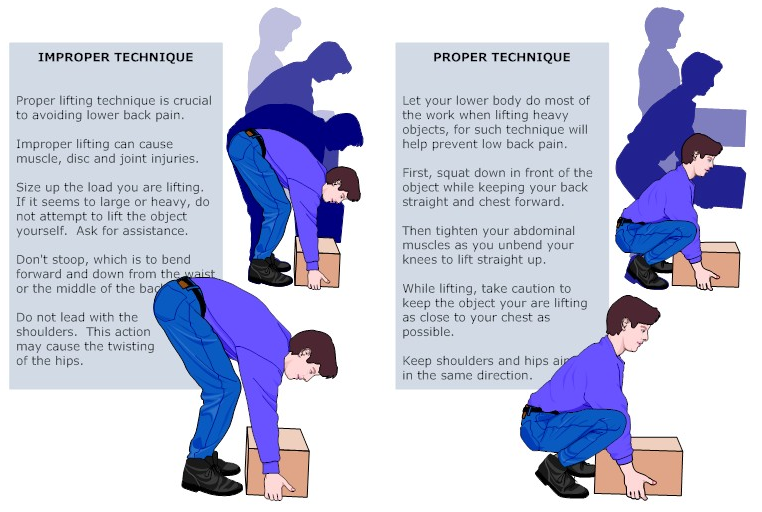
When lifting heavy objects, employees should bend their knees and use the large muscles of the leg instead of the smaller muscles of the back. Back injuries are the most frequent and often the most persistent and painful type of workplace injury.
When lifting;
- Assess the load first.
- Keep the weight close to your body.
- Keep the natural curve in your back.
- Lift with your legs — DO NOT lift and twist.
- Handle materials carefully
- Ask for help if the load is too heavy
- When lifting heavy objects, employees should bend their knees and use the large muscles of the leg instead of the smaller muscles of the back. Back injuries are the most frequent and often the most persistent and painful type of workplace injury.
CUSTOMER SERVICE TRAINING
Link to:
Introduction, Customer Service and Problem Customers sections of the Procedures Manual
CUSTOMER SERVICE & THE “RULE OF 1965”
This phenomenon is not new. Some failures in customer service are due to the anxiety of the massive changes we have seen. We should rethink customer service basics in today’s electronic environment. Some libraries retain a bias that keeps attitudes stuck in the past. Simply put, according to the Rule of 1965, anything the library did prior to 1965 is basic customer service and everything else is extra. By adhering to this rule, we guarantee that libraries are marginalized and rarely considered essential to any but the neediest or the most determined in our society. Look how people vociferously repeat that a hardback book is better than the electronic version! Remember – old-style thinking makes good libraries mediocre. The visibility that technology brings us is a double-edged sword. Often we offer new technology, but limit the resources we dedicate to it and that’s a shame.
Five things you can start today
- Remember that the customer is not the enemy. Look for ways to say “YES”. Lose the parental tones, many of our customers are over 18 and don’t have to take it anymore!
- Create a climate in your library that supports change. Appreciate different styles and learn to embrace the changes. Technology is moving forward with or without us!
- Survey the environment continuously. People give us free marketing info every day by telling us what they like and don’t like, what they use and don’t use. Start paying attention and share this info with other staff. Also listen to people who don’t use the library! They can be valuable. Look at other libraries, steal from the best and give them credit.
- Redirect resources. Change the status quo by using your time to make changes. Don’t wait for a bigger budget and extra time, there are things you can do now to improve our systems.
- Treat every customer like a person. Don’t categorize people – problem patron, angry mother, deadbeat borrower, greedy computer user – that makes us feel free to ignore their feelings and their needs. We are not hall monitors!
We have a long way to go in delivering service so in tune with our customer’s lives and needs that we are considered essential.
CUSTOMER SERVICE REVIEW
Our goal is to ensure the best library experience for all customers
ONE TEAM! ONE GOAL! NO LIMITS!
- The ABC’s of service are
- Attitudes
- Behaviors
- Connection we have with customers
- The people who use library services are external customers. The staff members are called internal customers.
- The attitude most responsible for customers not coming back is indifference.
- Why are loyal library customers so valuable?
They will become library advocates and free library advertising.
They will use more library services, for a longer time.
They are easier to serve than a first time customer.
- Several personal needs common to all customers are to be safe, secure, accepted, liked, listened to, acknowledged, appreciated, respected, trusted, understood, connected and valued.
- List of healthy attitudes and deadly attitudes
Healthy Attitudes
I like you
I respect you
I appreciate you
I’m interested in you
I want to help you
Deadly Attitudes
I’m too busy for you
I’m more important than you
I’m right; you’re wrong
I don’t care about you
I can’t
- Benefits of a smile.
- It reduces tension and stress, express friendliness, generates a smile in return and is universally accepted.
List of “Words to Use” and “Words to Lose”
Words to Use
Yes, I can
Certainly
I’d be happy to
My pleasure
Let me explain
Words to Lose
No, I can’t
That’s our policy
You’ll have to wait
Come back later
I’m too busy
- Describe three customer situation in which to use “Thank you for waiting.”
After retrieving a phone call placed on hold
After locating a book, video or DVD requested by a customer
After searching the internet to obtain information for a customer
- Customer MAGIC – Making A Good Impression Counts
MANAGING THE PROBLEM PATRON
General Guidelines
- Remain calm. Be receptive and non-judgmental.
- Listen carefully to a customer’s question or complaint.
- Pause, breathe deeply and think before responding.
- Speak in a relaxed tone. Repeat the customer’s comments as concisely as possible.
- If there is a justifiable need for an exception and you have the authority, make one.
- If an exception cannot be made, explain the policy in a relaxed tone, and if possible, show the customer the written policy or posted sign.
- Be pleasant, calm, and firm. DO NOT argue or touch the customer. Stick to the issue.
- When necessary, request the assistance of another coworker in the department/branch or a supervisor.
- NEVER be drawn into a physical or verbal confrontation with a problem customer under any circumstance.
SIGNATURE CUSTOMER SERVICE
L – Listen
A – Apologize
R – Respect
R – Resolve/Respond
F – Follow-up
S – Smile
I – Initiate
G – Greet
N – Notice
A – Attitude
T – Test
U – Understanding
R – Respect
E – Evaluate
Link to :
RULES OF THE RAPIDES PARISH LIBRARY
Located in Policies
MANDATORY ANNUAL TRAINING
Ethics Training
http://eap.ethics.la.gov/EthicsTraining/login.aspx
Mandated Reporter Training
- Follow the link: https://moodle.lcwta.org/login/index.php
- Sign up. Make sure to record your password for future reference.
- After creating a new account you will receive a notice that an email was sent to the address provided in registration.
- Go to your email, and click on the link that was sent in the email.
- Click on Site Home then General View Courses
- Scroll down and click on Mandatory Reporter Training.
- Click on Enroll.
- You must complete the following steps:
- Pre Test – Mandatory Reporter– be sure to click on Submit, you will then be able to go back to course and complete the next step.
- Mandatory Reporter Training
- Post Test – Mandatory Reporter
- Evaluation of Training (can skip this)
- Certificate
- Click on Certificate
- Print 3 copies
WHO GETS WHAT
Samantha gets…
Email ILS Clerk (Items) – email preferred.
***Copy brittney@rpl.org for emails to Samantha***
Memos
- On Search Report
- On Holdshelf Report – you can reduce or eliminate this report by regularly clearing your holdshelf!
- Outstanding Holds
- In Transit
- Serials – you can reduce the size of this list by regularly weeding your magazines!
On the fly – once an item has returned send the physical item in so that the records can be updated fully.
Barcode not found – send these in and indicate if you want the item returned to your branch.
Gifts – Customers often bring in items they feel the library should have. Send these in so that they can be added to your collection.
Overdue notices – email these right away please!
Returned mail – sending these in helps keep the database up-to-date.
Paging slips – When an item is looked for and not found, it is normal for staff to want to mark that item status “m” for missing. Don’t. Please don’t. This will cause the item to show up on another report – the On Search Report. Even if you cancel the hold and place it on another item we need to know that you didn’t find this copy and let us know you already filled the hold with another copy! SEND IN PAGING SLIPS, marked “-shelf”, with your initials, date and branch location.
Magazines to add – send in donated copies of magazines to be added to your collection
Cards 4 Kids Applications – send these in an interoffice envelope directly to Brittney @ ILS
Trina gets…
Call ILS (Patron) – Email preferred.
Memos & Related
- In Processing Report
- Missing Barcode Report
- Patron Record Corrections ***Copy brittney@rpl.org***
- Barcode Maintenance – Trina is the primary contact; however, anyone in ILS can help with this.
Inventory & Weed lists – return the lists and any problem items. Send barcode only of items to be weeded via email Copy brittney@rpl.org on weeds only. Do not include any spaces, tabs, indentions, titles, etc…
Call In – These items have an issue that can be resolved without sending the item in. Check the item record to determine the problem (Wrong Copy #, Update Item Location…) and email Trina with the physical item information (Barcode, Title, Copy #, Call #).
Lost & Paid – send Trina the paperwork only via email or interoffice envelope!
Collection issues – questions or concerns about customers sent to collection, as well as, requests for Paid in Full Letters.
Magazine and Newspaper Subscription problems
FRIENDS OF THE RAPIDES LIBRARY
WHO ARE FRIENDS OF THE RAPIDES LIBRARY?
We are people who are interested in having a strong library system in Rapides Parish. We are a non-profit organization and we have a common concern for the Library. Because you know and use the library’s resources, you can be the kind of Friend who helps develop a better library system for all of us. Besides having a large group that encompasses the entire Parish we have a Johnson (Lecompte) Branch Friends group and a Glenmora Friends group. They are your neighbors, your family, your grocer, even your doctor!
WHAT DO THE FRIENDS DO?
We sponsor free and interesting literary programs for the community. Friends provide the Library with volunteers and extra money for books, furniture, and equipment. Friends of the Library believe that good library service is important to everyone. They are ready to help the Library in any way possible. They also receive a quarterly newsletter informing them about what’s happening at the Library.
WHERE DOES THE MONEY COME FROM?
Most of our funds come through membership dues, book sales, and donations. We have an Annual-Book-Sale-In-The-Mall every summer and we operate a used book store called BookEnds. The popular used book sales are important sources of income for the Friends of the Rapides Library and they are a creative way of recycling unneeded library materials. Book lovers can browse the books at our BookEnds store, which is open every Wednesday and Saturday from 10:00 till 2:00 at the Martin Branch Library in Pineville.
HOW CAN I JOIN FRIENDS?
It’s easy to sign up for a Friends membership! Just fill out a simple form that you can get at any branch of the Rapides Parish Library, Annual Book Sale In The Mall, or at BookEnds. By being a member, each individual contributes to the tradition of excellence in library service that we all enjoy and appreciate. One of the many benefits you will receive is knowing that you can give back a little something to the library which has given you so much over the years.
Experience a feeling of satisfaction…
Join the Friends of the Rapides Library!
Membership Fee:
- $ 4.00 – Individual
- $ 2.00 – Junior
- $ 12.00 – Family
- $ 12.00 – Organization
- $ 50.00 – Contributing
- $100.00
RPL INCIDENT REPORT
Make copies for these as appropriate: Branch / Department _________
Police _____ Date / Time: _______________
Director _____
Asst. Dir. DS _____
HRM _____
Fill out as completely as possible
Date and time of incident:_______________________________________________________
Name of Subject ________________________________ Phone No._____________________
Address (if known)______________________________________________________________
Exact location (branch, specific area) ____________________________________________
Nature of incident, brief narrative of circumstances and action taken:
______________________________________________________________________________
______________________________________________________________________________
______________________________________________________________________________
______________________________________________________________________________
______________________________________________________________________________
______________________________________________________________________________
Continue on back, if necessary…
Witnesses (addresses, telephone numbers, if known)
NAME:_______________________________________________________________________
NAME:_______________________________________________________________________
SUBJECT DESCRIPTION (if appropriate)
Alias_____________________________________ Sex _________ Race ________________
Age _________ DOB ______________Build _________________Height _______________
Weight _________ Skin tone _____________ Eyes ________ Hair color ____________
Hair length _________________Hair style/type _________________________________
Facial hair ________________ Hat _____________ Coat/Jacket ____________________
Sweater _________________ Blouse/shirt ___________________ Shoes ___________
Skirt/trousers ___________________________ Jewelry ___________________________
Identifying marks/scars/tattoos: _____________________________________________
Voice/speech:_________________________________________________________________
Known associates and/or areas frequented: _________________________________
Name of person filling out this form:_________________________________________
Date and time form filled out: _______________________________________________
Continue any additional information on the reverse of this form…
BOMB THREAT
Original – Police
Copy – RPL Director
Library Location: _________________________ Phone number:_________________
Date of call:_______________________________ Time call received:_______________
Questions to ask:
1. When is bomb going to explode? ______________________________________
2. Where is the bomb?___________________________________________________
_____________________________________________________________________________
3. What kind of bomb is it and what does it look like?____________________
______________________________________________________________________________
4. Why did you put the bomb here?_______________________________________
______________________________________________________________________________
Description of call and caller’s voice:
Check one: _____ Male _____ Female
_____ Young _____ Old _____ Middle age
Tone of voice:______________________________________________________
Accent:___________________________________________________________
Background noise:__________________________________________________
Did you recognize the voice? _____ Yes _____ No
If yes, and you know the person’s name, address and telephone number, list it below:
_____________________________________________________________________
_____________________________________________________________________
_____________________________________________________________________
Additional information:___________________________________________________
______________________________________________________________________
EMERGENCY PROCEDURES
FIRE/ALARM
- Sound the alarm, if alarm has not sounded.
- Call 911. Alarm is a noise alert only.
- Evacuate building. Allow no one to remain or enter building.
- Attempt to extinguish, if safe to try.
- If there is time, turn OFF equipment and turn ON lights.
- Close doors to make fire breaks.
- Report to supervisor, security monitor (if there is one), and the highest person possible on the Chain of Authority poster.
- Supervisors, assemble staff and patrons in designated area.
- Inform firefighters of location of fire.
- Supervisors, make every effort to ensure everyone is out; report absences to firefighters.
POWER FAILURE
- Contact utility company. If possible, determine length of time for outage. Contact Direct Services Coordinator or Director for instructions and inform them if building is too dark, too hot or too cold. They will decide when and if to close the building, with your input.
- Allow no one to use a lighter or matches. Use flashlights only.
- If the Library closes, customers should leave quickly and take possessions with them.
- Post a sign on the entrance door which says: “The Library is closed due to a power failure and expects to open >>>>”.
BOMB THREAT
EVACUATE BUILDING AND CLOSE. NOTIFY POLICE IMMEDIATELY.
- Keep caller on the line and ask them to repeat message. Attempt to write down every word spoken on Emergency Form II (should be by phone).
- Ask for the location of bomb and time of detonation. Tell caller that building is occupied and bomb could cause injury or death of innocent people.
- Listen closely to voice: male or female, voice quality (calm, excited), accents and speech impediments.
- Note background noise – motors, music, trains or any clue as to origin of call.
- Immediately after caller hangs up, contact police and notify administration. Write down any additional information. Be available to police.
- Evacuate to a designated area.
- Allow NO ONE other than law enforcement to look for bomb.
ACTIVE SHOOTER
RUN
- Find nearest exit and immediately evacuate, if possible.
- Exit regardless of whether others agree to follow.
- Take no possessions with you.
- Help others escape, if possible.
- Prevent anyone besides law enforcement from entering the area where the shooter might be.
- Keep your hands visible.
- Follow instructions of any police officers.
- Do not attempt to move wounded people.
- Call 911 when you are safe
HIDE
- If evacuation is not possible, attempt to hide where the shooter is less likely to find you.
- Stay out of the shooter’s view.
- Be sure that your hiding place provides protection if shots are fired in your direction, e. g. an office with a closed and locked door.
- Be sure not to trap yourself or restrict your options for movement.
- If you are behind a door, be sure to lock the door and blockade it with heavy furniture.
- Silence your cell phone and turn off any source of noise, such as radios or televisions.
- Remain Quiet!!
FIGHT
- As a last resort, and only if you are in imminent danger, attempt to disrupt or incapacitate the shooter.
- Act as aggressively as possible against him or her.
- Throw items and improvise weapons.
- Commit to your actions.
At arrival of law enforcement:
- Follow officer’s instructions.
- Raise hands and spread fingers. Keep hands visible at all times.
- Avoid making quick movements and do not point, scream or yell.
- Do not stop and ask officers for directions. Simply exit through where the officers enter the premises.
GLOSSARY
Browser – Software which allows a user to access the Internet.
Call Number – A sequence of letters and numbers that helps the user to locate an item’s location in the library.
Example: AF ABC
xF ABC
LA 917.63 ABC
V C1007
Dewey Decimal Classification – A classification scheme which divides all knowledge into ten sections, based on the numbers 000-999.
Fiction – Items which are not factual in content. For example, novels, short stories, picture books.
Filtering – Software which allows the library to block some Internet sites which may not be appropriate for our patrons to use in public.
Genre – The type of fiction. For example: mystery, romance, science fiction, etc.
HDH – Huie-Dellmon House. Administrative offices of RPL. Public meeting room available here.
ILL – InterLibrary Loan department. They are located in the Main Library building, and send and receive intra- and inter-library loans.
Inter-library Loan – A loan of an item between library systems.
ISBN – International Standard Book Number. A unique number assigned to each book, audio, video, etc. published.
LC – Library of Congress. The nation’s library.
LC Number – A unique number given by the Library of Congress to the title of an item, and used in cataloging and ILL.
Materials – Books or media purchased by the library for its collections.
Materials Budget– The part of the library budget used to purchase materials.
Mill – A type of parish property tax. One mill is $0.10 per $1,000 property value, after the $75,000 homestead exemption. Property other than the home where you live is not exempt.
RPL’s millage is 6 mills. This tax is renewed every ten years.
Example, for one mill:
If the home is valued at $80,000, the tax liability would be:
$80,000 – $75,000 = $5,000 x $0.10 = $0.50 per year.
Non-fiction – Items which are factual in content.
Paperbacks, Mass Market – Paperback books designed to fit in a purse or pocket, and arranged on smaller shelving by genre.
Paperbacks, Trade – Paperback books that are larger than mass market. They are classified into the regular collections of the library, and sometimes covered with adhesive plastic to lengthen their lives.
Patron – A Rapides Parish Library borrower, customer or user.
Reference Department – A department in the Main Library whose function is to answer questions and provide help to the public, and serves as a backup to the reference service offered in the branches.
Reference Collection – Collections of items at the Main Library and at each branch which are meant to be used in-house only. Items in these collections have call numbers which begin with an asterisk.
Example: * 020 WOR
RPL – Rapides Parish Library
Serials – Magazines or newspapers.
State Aid – Funds received from the State of Louisiana, which are used for library materials and automation equipment.
TS – Technical Services. A department which catalogs and processes new items for the library.
VF – Vertical File. A collection of file folders containing articles, newpaper clippings and pamphlets on topics of interest to our users. This includes a Louisiana Vertical File.
Weeding – A term used for discarding old, worn, damaged or out-of-date items. Each site regularly weeds their collection, to keep it fresh and of interest to our users.
EZ-WEB TRACK FOR STAFF
General comments:
- This web-based software is taking the place of punching a time clock or keeping a timesheet.
- Each day that you come to work, you will need to punch in and out as you go about your day.
- You will need to know a badge number and PIN. If you do not know this, ask your manager, or call the HR Clerk.
- If you need to take leave, either before or after the fact, you will need to inform your manager. You will not be able to put in leave time; only your manager can.
- If you forget to punch in or make some other mistake, inform your manager. Your manager is the only one who can take care of this.
- Circulation subs, your manager is the Assistant Director for Direct Services.
Getting in:
- On the desktop of a staff PC, click on the Internet Explorer shortcut: Login (http://timekeeper2/ebspunch/)
- OR, open the Staff Intranet, go to the Human Resources Link, and click on the EZ WebPunch link.
- Put in your badge number and password.
- Click on “OK” or just hit the ENTER key
Doing punches:
- Once you are in, click on “In Day”
- Once you do that, give it a few seconds and it will return to the Login screen.
- Continue to do this throughout the day. Use “Out Lunch”, “In Lunch” and “Out Day as appropriate.
- Remember, if you make a mistake or forget, you will need to get your manager to correct your mistake.
- If you want to see how you are doing on your week, just click on “Punch Report” and then “Employee Time Sheet”.
PLEASE NOTE:
- There is a “7 minute rule”. This means that while you will be able to see the actual time that you clocked in and out on the Employee Time Sheet, if it is seven minutes or less after, the hours will round up to the quarter hour; if it is eight minutes or more after, it will round down to the quarter hour.
For example:
If you work a total of 8hrs 5 minutes, the total will show 8:00.
If you work a total of 7 hrs, 55 minutes, the total will show 8:00.
If you work a total of 6 hrs 25 minutes, the total will show 6:30.
If you work a total of 6 hrs 35 minutes, the total will show 6:30.
Here is an easy chart:
| Quarter Hour Rounding Chart | ||||||
| To Get Paid From: | ||||||
| 7:00 | 7:15 | 7:30 | 7:45 | |||
| 0 | 0.25 | 0.5 | 0.75 | |||
| Punch In Within | ||||||
| 6:53-7:07 | 7:08-7:23 | 7:24-7:37 | 7:38-7:52 |
TRANSFERS
If you:
1. Work at more than one location, such as BK and RC, or
2. Sub at your own branch or other branches, or
3. Are only a sub:
You will need to know about how to use the “Transfer” button. Keep reading to find out about this.
It’s really easy; there is just one more step:
Punch in for the day, as above.
Let the screen return to the login screen.
Login a second time.
Click on the “Transfer” button.
Choose the “Dept/Branch” from the drop-down list.
Choose the “JobCode” from the drop-down list.
Click OK.
Do this every time you punch IN, but not OUT.
A word about JobCodes:
Circulation Subs = CRCSUB
MN Circ Clerks = CC
Branch Circ/Ref Clerks = CRC
MN Reference Specialists = RX
Branch Manager = BM
(You have to know if you are a I or a II)
Outreach Clerks = OC
(You have to add where you are. EX BK = OC-BK)
ORGANIZATIONAL CHART
CHAIN OF AUTHORITY
ADDRESSES, SCHEDULES AND PHONE NUMBERS
PHONE EXTENSIONS
ABBREVIATIONS
Main Library MN
Westside Regional Library WR
Robertson Branch RB
Libuse Branch LB
Martin Library MR
McDonald Branch MC
Johnson Branch JN
Boyce Branch BC
Hineston Branch HN
King Branch KG
Bookmobile BK
Preschool Outreach Plus POP
Loan Department ILL
Integrated Library System ILS
Reference Department REF
Technical Services TS
Huie-Dellmon House HDH
HUIE-DELLMON HOUSE (HDH)
The Huie-Dellmon House and Gardens were donated to the Rapides Parish Library in 1993 by the Huie-Dellmon Foundation. The Foundation, created to handle the estate of two families prominent in the management of the Alexandria Daily Town Talk, also funded the complete renovation of the house and major improvements to the gardens and outbuildings. The house has been developed into administrative offices and a meeting room for the Library.
JUVENILE CARD CONVERSATIONS MADE EASY(IER)
Bookmark on your desktop for easy reference.
Utilize any of these points and ideas. Remember to use your own words (no one expects you to recite this verbatim). Do keep your language and tone professional and neutral (as with any transaction) regarding the laws and any legislation.
If anyone has more intensive questions or concerns OR if you are uncertain or uncomfortable answering, do not hesitate to invite the patron to contact the Director. Provide the Director’s office number and extension (318-445-6436 ext. 1001) and email (celise@rpl.org).
Saying “I’m not certain about that. Let me contact my director and get back with you” is acceptable.
Remember that card applications must be fully completed.
Talking Points
- All juveniles have the opportunity to get the eye-catching new card.
- As always, parents and guardians have the opportunity, right, and responsibility to decide upon the level of access and which materials their child will have.
- We strongly encourage parents and guardians to take an active role in their children’s visits to the Library.
- No items in the RPL collection are currently labelled “sexually explicit.” Under current Louisiana law AND RPL policies, only items that have been deemed “sexually explicit” by the RPL Board of Control in an open meeting will be labeled as such and prohibited from check out by juveniles with limited access cards.
- Should a patron feel that an item should be deemed “sexually explicit,” they must complete the Request for Reconsideration form. That starts the reconsideration process.
- All parents and guardians are still required to be with their child (under ten years old) in the Library.
- The Rapides Parish Library maintains a collection to meet the needs of all individuals in our community, and everyone is welcome.
**Refer to the law and guidelines as well as the new policies as needed**
La RS 25:225 https://www.legis.la.gov/legis/Law.aspx?d=1336854
Materials Circulation Policy & Collection Development Policy https://www.rpl.org/index.php/about/policies/
Answers to Some Questions You May Have/Hear:
- When the procedure refers to a completed application, do all the fields need to be filled to be considered complete? They might have only one phone number and they may not have an email address.
All fields must be complete – this is a legal document – therefore N/A or None should be used in any field for which there is not an answer.
- What will my child not be able to access?
Under these guidelines, the only items that will be restricted from the physical collection are those deemed “sexually explicit” under the parameters of the law as decided upon by a majority vote of the library’s board of control in a public meeting.
If you indicate that your child can have no digital access, they will not have access to any of the Library resources that require a card number and pin. They also may not be able to participate in some Library programming that requires a certain level of digital access.
- Will all the books be pulled from the shelves for review?
No. An item will be placed for consideration as to whether it is sexually explicit ONLY if a patron fully completes a request for reconsideration form and indicates on the form that they believe the item is sexually explicit as detailed in the law.
- Does this mean that your library has inappropriate books/ obscene books/ porn?
We do not provide for circulation any materials that are labelled as pornography.
Each family has different standards, and the Library encourages each individual and each family to make the decisions that are right for them. We don’t decide what is appropriate or inappropriate for someone else’s family.
- What happens if I don’t complete the new juvenile card application for my child?
All libraries in the State of Louisiana are now required by law to implement these options for restricted juvenile card access. On June 1, 2024, all juvenile RPL cardholders’ cards that have not been updated will expire. In order to check out materials or use digital resources, an updated form and new card will be required.
- Does my child have to be present to change to the new card?
No. The parent or guardian can complete the application and signature without the child present.
- Do I need to accompany my child to the library to use their card?
It is required if the child is under 10 years old. It is suggested otherwise. The library is great family outing spot!
- Can I send the signed form back with my child?
No, the parent or guardian must be present for the awarding of the card. No juvenile cards will be dispersed without the parent or guardian being in the physical presence of library staff (in a library location or at an outreach event) and fully completing the application.
- What if a parent refuses to get their child a card, and they give their library card for their child to access a computer or complete a self-checkout?
It is not within library policy parameters for a parent to give their card to their child to access the computer or complete a checkout. However, if the parent checks out a computer and hands it to the child/ is seated with the child or hands their card to their child to complete a checkout while they are there, they are giving their tacit approval, and we are not to intervene with someone’s parenting.
all minor patron records that do not have a signed application on file with records retention will be blocked by MBLOCK “s” and the minor patron record templates for new patrons will, by default, contain MBLOCK “p”. Do not touch the MBLOCK – ILS will update these.
This means that until ILS processes the application the minor patron record is blocked from use. You may override the block and check out to the minor in the presence of the parent/guardian at the time the card is issued and within PTYPE allowances, but do not override on any other occasion for any reason.
As the Library Card Application is a legal document it is very important that the information on the Library Card Application EXACTLY matches the information contained in the Sierra Patron Record. Please use the application to fill in the Sierra record – doing so will prevent application discrepancies and catch any corrections while the applicant is present – then there will be no need to hold an application and the faster the block can be removed.